Last Verified: June 2026
If you own property in Jamaica and live in the USA, Canada, the UK, or elsewhere overseas, you can pay your Jamaican property taxes online without flying home. The process is designed to be convenient, but you will need the correct property details before you begin, especially your valuation number.
Whether you own family land, an inherited property, a rental investment, or the home you plan to retire to one day, staying current on your property taxes helps protect your investment and avoid unnecessary penalties.
This guide walks you through the online payment process step by step, explains common challenges overseas property owners face, and highlights a few important details that are often overlooked.
Why Online Payment Matters
Years ago, many Jamaicans abroad relied on relatives, attorneys, or friends to stand in line and handle property tax payments. Today, Tax Administration Jamaica (TAJ) allows property owners to manage their accounts online from almost anywhere in the world.
Paying online helps you:
- Stay current on annual property obligations.
- Avoid penalties and interest charges.
- Access payment history more easily.
- Manage your property without traveling to Jamaica.
Island Breeze Tip: Create a dedicated digital folder for all your Jamaican property records. Keep copies of your valuation number, title information, tax receipts, survey plans, and important emails in one place.
What You Need Before You Start
Before logging into the TAJ portal, gather the following:
- Your valuation number.
- Your strata lot number (if applicable).
- A valid credit or debit card.
- Access to your email account.
Helpful Documents to Have Nearby
- Previous property tax receipts.
- Property tax notices.
- Land title documents.
- Solicitor paperwork.
- TRN information.
The most important item is your valuation number. Without it, the online system cannot locate your property records.
Island Breeze Tip: If you inherited property or family members have different pieces of the paperwork, focus on finding the valuation number first. Once you have that number, the rest of the process becomes much easier.
If you live overseas and cannot locate your valuation number, old tax receipts, title information, or property details, Island Breeze Property Assist Online may be able to help guide you through the process of locating the records needed before attempting payment.
Island Breeze Property Assist Online provides administrative guidance and support only. It does not provide legal, tax, valuation, surveying, or real estate services.
Understanding the Valuation Number
One of the biggest misconceptions among overseas property owners is that the valuation number appears directly on the land title.
In many cases, it does not.
The valuation number is a separate property identifier used by the tax system.
You can usually find it through:
- Previous property tax receipts.
- Property tax notices.
- National Land Agency (NLA) records.
- eLandJamaica searches.
- Volume and Folio searches through NLA records.
If you cannot locate it, you may need assistance from TAJ or the National Land Agency.
Step-by-Step Guide to Paying Jamaican Property Tax Online
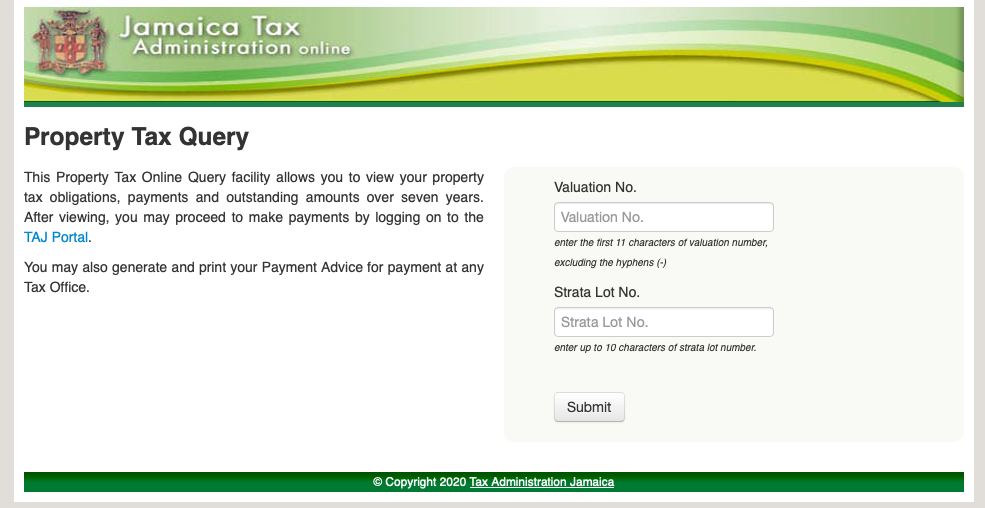
Step 1: Check Your Property Tax Balance
Visit the Property Tax Query section of the TAJ website.
This tool allows you to view:
- Outstanding balances.
- Previous payments.
- Payment history going back several years.
You will need your valuation number and, if applicable, your strata lot number.
Step 2: Log In to the TAJ Portal
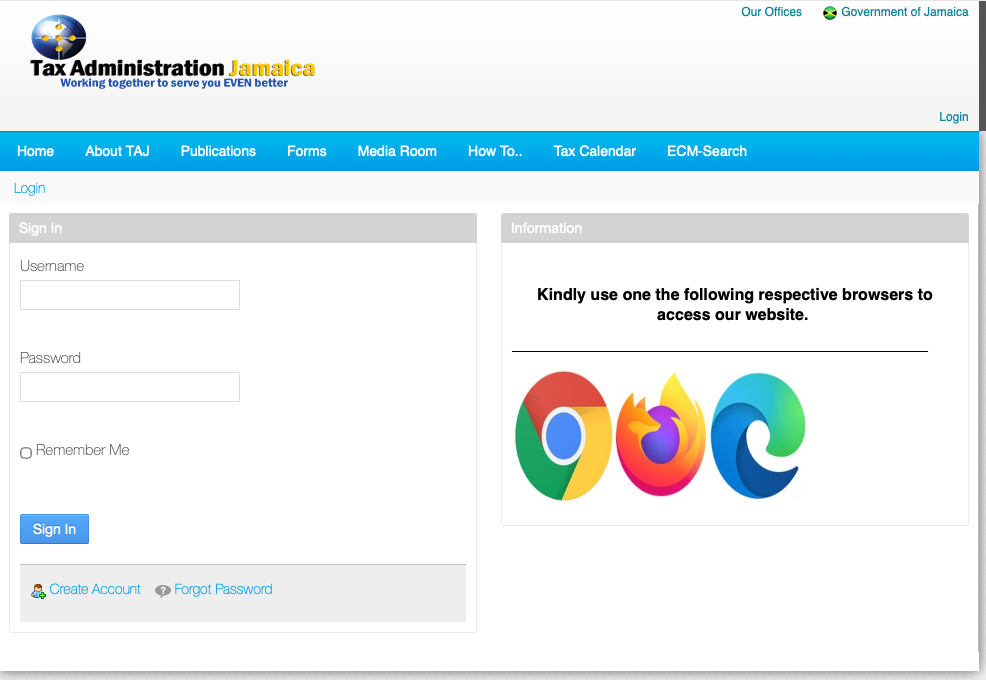
Visit the official TAJ website and select the Login or Client Login option.
If you do not already have an account, register and create one before proceeding.
Step 3: Locate the Property Tax Section
After logging in, navigate to the eServices section and select Property Tax or Pay Taxes and Fees.
The wording may vary slightly depending on portal updates.

Step 4: Enter Property Information
Enter:
- Valuation Number.
- Strata Number (if applicable).
If your property is not part of a strata development, enter 0 in the strata field.
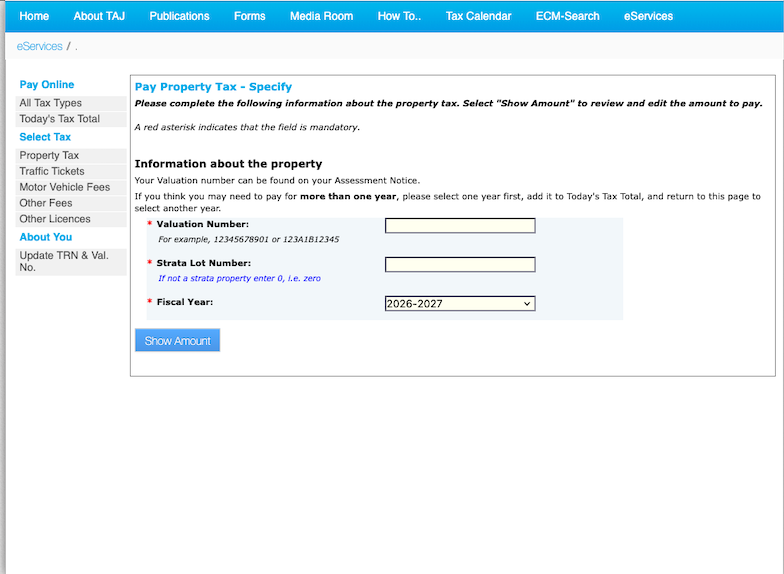
Step 5: Select the Tax Year
Choose the fiscal year you wish to pay.
Jamaica’s property tax year runs from April 1 through March 31.
The system will display the amount currently owing.
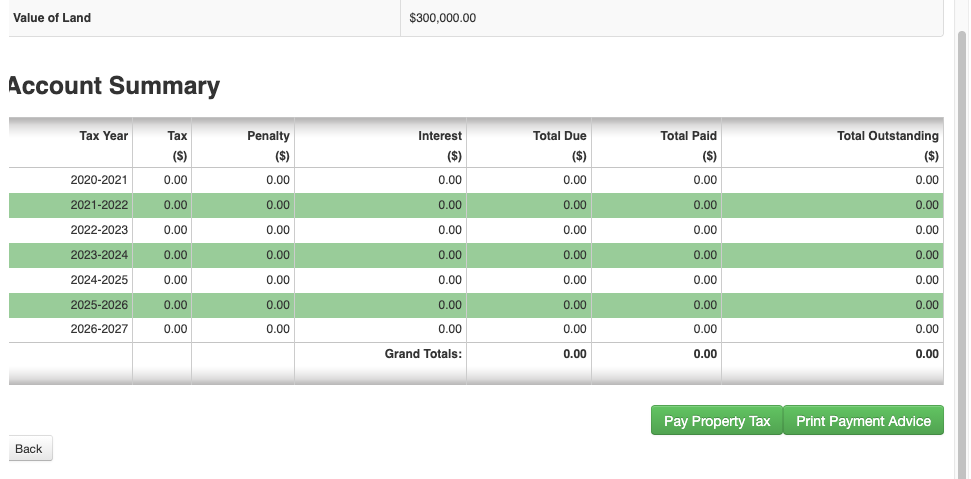
Step 6: Review the Property Details
Before moving forward, verify:
- Property address.
- Owner information.
- Tax year selected.
- Outstanding balance.
If anything appears incorrect, stop and verify the information before paying.
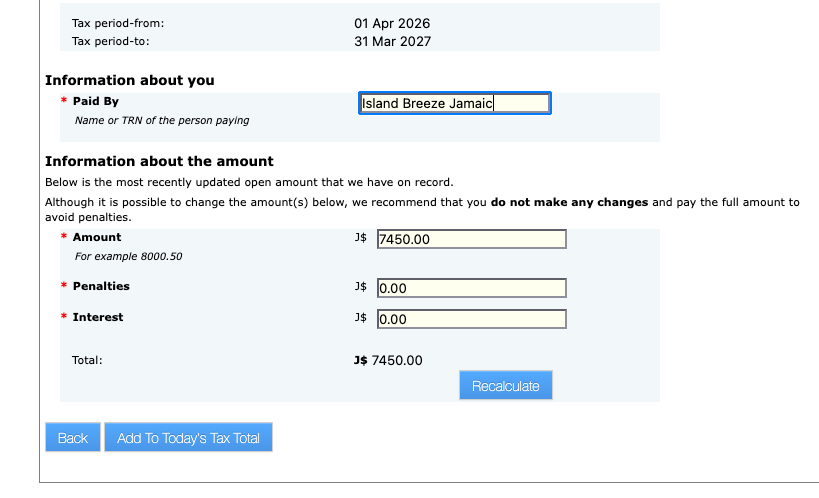
Step 7: Proceed to Payment
Enter your payment information using:
- Visa.
- Mastercard.
- Eligible debit cards with credit card functionality.
Review all details carefully before submitting the transaction.
Step 8: Save Your Receipt
Once payment is successful, the portal will generate a Statement of Payment.
Immediately:
- Download the receipt.
- Save a PDF copy.
- Email a copy to yourself.
- Store it in your property records folder.
Island Breeze Tip: Always take a screenshot of the final confirmation screen before closing your browser. Even if the receipt arrives by email later, having an immediate backup can save headaches.
Property Tax Due Dates for 2026–2027
Property taxes became due on April 1, 2026.
Property owners may choose to pay:
- In full.
- Half-yearly.
- Quarterly.
A grace period generally applies through April 30.
Payments made after the applicable deadline may attract a 10% penalty.
Always verify current deadlines directly with TAJ before making payment.
Common Mistakes to Avoid
Not Knowing the Valuation Number
This remains the most common issue for overseas property owners.
Paying the Wrong Property
Always verify the property description before completing payment.
Leaving the Strata Field Blank
If the property is not strata, enter 0.
Missing Installment Deadlines
If you choose half-yearly or quarterly payments, track future due dates carefully.
Not Saving the Receipt
Download and save every receipt immediately after payment.
Assuming Market Value Equals Tax Value
Property taxes are based on the unimproved value of the land, not the market value of the home.
Managing Inherited Property Without Verification
Inherited property may have outstanding taxes, unresolved ownership issues, or old records that need updating.
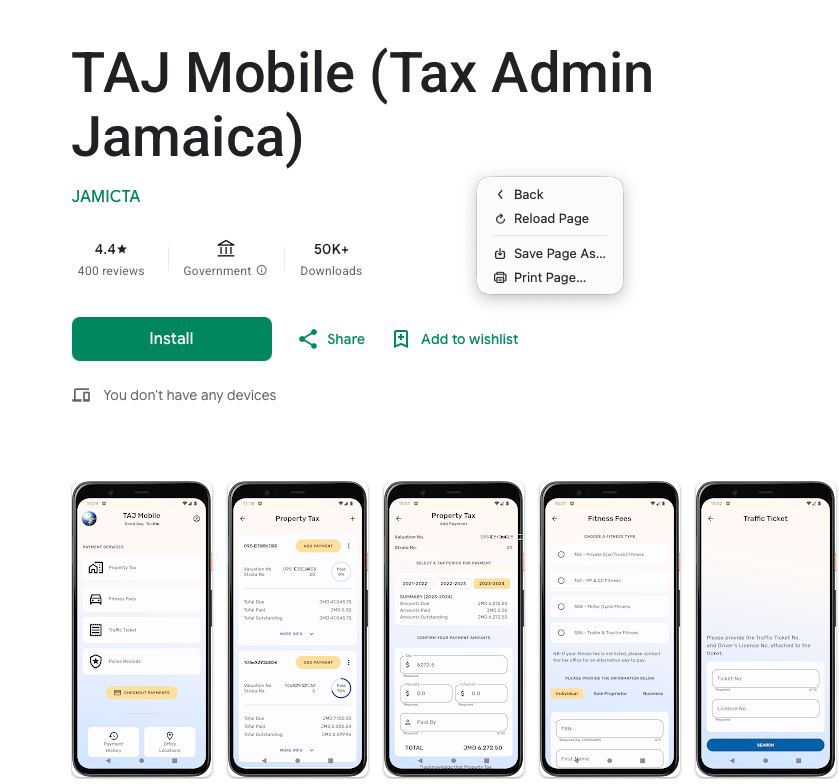
Using the TAJ Mobile App
TAJ also offers a mobile application for Android users.
The app allows you to:
- Pay property taxes.
- Search properties using valuation numbers.
- View payment history.
- Regenerate payment statements.
- Access additional TAJ services.
At the time of verification, the official TAJ mobile app was available through Google Play.
Frequently Asked Questions
Can I pay Jamaican property tax online from overseas?
Yes. The TAJ online portal allows overseas property owners to make payments from virtually anywhere with internet access.
Do I need a valuation number?
Yes. The valuation number is required to identify the property and complete payment.
What if I do not know my valuation number?
Check previous receipts, property tax notices, NLA records, or use eLandJamaica. If necessary, contact TAJ or NLA for assistance.
Do non-strata properties require a strata number?
No. Enter 0 in the strata field.
Can I pay multiple years at once?
In many cases, the portal allows multiple outstanding years to be added to the payment total before checkout.
Will I receive proof of payment?
Yes. A Statement of Payment is generated after a successful transaction.
Can I pay taxes on inherited property?
Yes. However, paying taxes does not establish legal ownership. Estate and title matters must be resolved separately through the appropriate legal channels.
Related Island Breeze Jamaica Guides
- How Jamaicans Abroad Can Apply for a TRN From Overseas
- How to Find Your Jamaican Valuation Number Online
- The Jamaican Overseas Homeowner Checklist
- How to Buy Property in Jamaica From Abroad
- Understanding Family Land in Jamaica
Final Thoughts
Paying Jamaican property taxes online from overseas is easier than ever once you have your valuation number and property records organized.
The biggest challenge for most diaspora property owners is not the payment itself. It is locating the correct records, confirming ownership details, and keeping everything organized year after year.
Take the time to secure your valuation number, save your receipts, and verify your information carefully before submitting payment. A few minutes of preparation can prevent major headaches later.